Showcase
I’ve added a showcase page to demonstrate some of my more interesting work over the years. Go check it out via the menu bar up top or simply click here.
Well, they’re just command prompt pictures, but hey it’s better than nothing right?
I’ve continued to develop my binary packaging system, awkwardly titled the ‘Binpressor’. It has now come fairly far into a stable release. Files can be packaged, and the utility can also unpackage files. Lets step through that.
Here I have a folder that contains all the images I use as part of a Uni project. 84 textures, some of which are high resolution hence the folder size of 54.6MB. Let’s give the utility a test drive by packaging the contents of this folder!
Files are recursively added into a list of prepared files. A header file is then generated based on various settings pre-defined in the program (such as buffer sizes for file names) and each file generates its own descriptor that tells the binary program how large a file is, what the file name is and what type of file it is. Now that we have a fancy little package, let’s now unpackage it, made possible by the handy descriptors that we’ve exported.
I can now open up the folder and verify that the image data has been correctly extracted by the fact that the thumbnails are all correctly generated. Upon hovering my mouse over a file, the file details look correct, and opening any of these files results in the correct display of the image. I have actually taken this a step further, and actually packaged the package utility itself, then unpackaged it, then successfully managed to use the unpackaged file to package another file!
One thing you might have noticed is that the utility lists ‘compressing’ and ‘uncompressing’ lines. Yep, that’s a new feature that I’ve added in today. I’ve integrated a C-wrapper around the LZMA SDK, meaning I have access to fast and efficient compression features. You’ll notice some strange scenarios where the compressed file is actually larger than the uncompressed file, but this can be safely ignored due to the very tiny byte differences.
Here I’m compressing a virtual machine settings file down from a small 104 kilobytes (106,496 bytes) down to an even smaller 223 bytes. Mind you that the size information at the bottom of the window does not take into account compression information at the moment.
With just over a week left at Uni, I’ve been finishing off items left over before I’m completely done (assuming I don’t fail of course). Meanwhile I’ve already began developing some theories based on some projects I can work on. I’ve recently began designing a modularised hybrid 3D game engine, developed by me with the exception of physics and sound libraries. Over the past few months I’ve been developing mainly with the Ogre3D graphics library, and although it’s flexible, matured and powerful, I’d like to start my own process, partially as a great educational experience – a convenient bonus on top of a bachelor degree, no?
As a small project I’ve already began, I’ve been developing my own proprietary binary packaging format that allows me to store files. Rather than using ZIP, RAR, or other common archive files I’ve developed my own, allowing me to use information stored in my own way, which is also a major security boost as no one will be able to simply extract assets out of the packages. Tthen again, modifiability is always a good thing so it would only be for core files. Again, I back my reasoning behind “an educating experience”.
Currently there is no compression being performed on the packages, and I’m contemplating whether or not to bother as file-size is not so much an issue. Uncompressed data loads faster, and compression is only really useful for distribution and such, which is already handled by compression algorithms in installation software or digital distribution platforms.
The packaging tool is currently simply a console program, allowing me to drop files or folders onto it to recursively package all highlighted files into a single package. At a not-too-distant later date I’d like to start writing a reader allowing me to interpret the files in system memory, and eventually finish the binary package format with an extractor so files can be retrieved outside of memory (which is essentially very easy if the reader is already developed). Whether I’ll develop a graphical user interface for a tool is still undecided at the time, although at the moment I do not find it particularly necessary unless I plan on distributing the application for anyone looking for a light and simple binary package format (except then everyone would be able to read the packages!).
The last item I’ll cover is the mixed architectures I’ve used. Rather than writing a system to handle file splitting and large file sizes, I’ve simply created a 32-bit and 64-bit version of the packager. Code-wise there’s very few changes except for the data types. While the packager is not intended for files larger than 2GB, the option is there should I feel the need to waste my hard drive space.
Apologies for the wall of text, but as it’s a binary format I really don’t have any images to show for this post. If you’ve skimmed over it, hopefully it may be of some interest to you.
Over the past 21 weeks at Uni I’ve been in the process of developing a completely functional 3D game, resembling a third-person, stealth-based ninja game. With three weeks of development left until the final hand-over there’s a fair bit left to do. A major issue that arose somewhat midway through the project was performance due to the complex outdoor environments. The main issue was the fixed-function pipeline lighting system which was causing batches in the scene to be redrawn, resulting in both huge batch counts (thousands) and huge triangle counts (over four million).
The way scene optimisation is set up is by performing static geometry batching on the level itself, an integrated feature of the Ogre3D 1.8 rendering library. This combines the thousands of components that the game’s level is built up of into one or more various regions – right now every 100 game units. Fixed function pipeline lights as well as most common shader-based lighting techniques require a a model to be redrawn for each light that affects it. As levels are built out of rather large regions formed by combining level assets, this results in very large redraws, seriously hampering performance when even half a dozen lights are introduced in the level.

Experimenting with the fast lighting algorithm with colour toning – No normal mapping is present yet.
To solve this issue, a rather experimental lighting technique was introduced. A texture is generated that covers the entire level at a very low resolution (in my scenario, 64×64 pixels). Each pixel represents a region that one light can be placed. The RGB value of each pixel represents the exact position of the light (R – X, G – Y, B – Z) in the 3D world. Each update light information is then applied over the entire world in a single pass with no redraws. This results in extremely fast lighting calculation with absolutely no performance hit for additional lights. What this means is that a scene, in theory, could have literally thousands of lights.
Another benefit to the lighting system is the fact that this is not a form of lightmapping but is infact real-time. This means that moving objects within the level have real-time lighting and even better, lights can actually be moved around as well by updating the generated texture each frame.

Addition of enhanced ambient lighting and normal mapping. Incorrect triangle/batch count due to SMAA shader.
The shader was initially provided by an Ogre3D forum moderator, Kojack, providing a very simple version of the shader in what was definitely no more than 20 or 30 lines within the shader. I expanded this to include real-time normal mapping, texture mapping as well as allowing lights to have individual colour and brightness values to create the intended lighting effect within the scene.
Shader code:
sampler2D Texture1: register(s0);
sampler2D Texture2: register(s1);
sampler2D NormalMap: register(s2);float3 lookup(float3 mappos, float3 offsetpos, float3 norm, float3 bump)
{
float3 c = float3(0, 0, 0);
float4 streetlightcell = tex2D( Texture1, offsetpos.xz+mappos.xz );
if(streetlightcell.a > 0)
{
float3 lightvec = streetlightcell.rgb – mappos*1000;
float dist = length(lightvec);
lightvec=normalize(lightvec);
c = streetlightcell.aaa * max((dot(lightvec,bump)/50) * (1 /(dist*0.005)),0);
}return c;
}void gridlight_vp(float4 position : POSITION,
float4 diffusein : COLOR0,
float2 texCoord0 : TEXCOORD0,
float3 normal : NORMAL,
float3 tangent : TANGENT,
float3 binormal : BINORMAL,
out float2 oTexCoord0 : TEXCOORD0,
out float4 oPosition : POSITION,
out float3 posAsColour : TEXCOORD1,
out float4 diffuseout : COLOR0,
out float3 oNormal : TEXCOORD2,
out float3 oTangent : TEXCOORD3,
out float3 oBinormal : TEXCOORD4,
uniform float4x4 worldViewProj,
uniform float4x4 world,
uniform float4x4 WorldInverseTranspose)
{
oPosition = mul(worldViewProj, position);
posAsColour = (mul(world, position).xyz)*(1.0/1000.0);
diffuseout = diffusein;
oTexCoord0 = texCoord0;oNormal = normalize(mul(normal, WorldInverseTranspose));
oTangent = normalize(mul(tangent, WorldInverseTranspose));
oBinormal = normalize(mul(binormal, WorldInverseTranspose));
}void gridlight_fp(
float2 texCoord0 : TEXCOORD0,
float4 diffuse : COLOR0,
float3 posAsColour : TEXCOORD1,
float3 norm : TEXCOORD2,
float3 tangent : TEXCOORD3,
float3 binormal : TEXCOORD4,
uniform float4 ambient,
out float4 oColour : COLOR)
{
// Calculate the normal, including the information in the bump map
float3 bump = 1.0 * (tex2D(NormalMap, texCoord0) – (0.5, 0.5, 0.5));
float3 bumpNormal = norm + (bump.x * tangent + bump.y * binormal);
bumpNormal = normalize(bumpNormal);float gridstep = 1.0 / 64.0;
norm = normalize(norm);
float3 gridlights = (
lookup(posAsColour, float3(gridstep*-1,0,gridstep*-1),norm,bumpNormal)+
lookup(posAsColour, float3(gridstep*0, 0,gridstep*-1),norm,bumpNormal)+
lookup(posAsColour, float3(gridstep*1, 0,gridstep*-1),norm,bumpNormal)+
lookup(posAsColour, float3(gridstep*-1,0,gridstep*0 ),norm,bumpNormal)+
lookup(posAsColour, float3(gridstep*0, 0,gridstep*0 ),norm,bumpNormal)+
lookup(posAsColour, float3(gridstep*1, 0,gridstep*0 ),norm,bumpNormal)+
lookup(posAsColour, float3(gridstep*-1,0,gridstep*1 ),norm,bumpNormal)+
lookup(posAsColour, float3(gridstep*0, 0,gridstep*1 ),norm,bumpNormal)+
lookup(posAsColour, float3(gridstep*1, 0,gridstep*1 ),norm,bumpNormal));
//oColour.rgb = ambient.rgb + /*diffuse.rgb * */ gridlights;// + float3(ogrelight,ogrelight,ogrelight*0.7);
//oColour.a = 1;float4 texcell = tex2D(Texture2, texCoord0);
gridlights.b = gridlights.b * 0.8;
oColour.rgb = (float3(0.3137254901960784, 0.3137254901960784, 0.3725490196078431) + gridlights) * texcell.rgb;
oColour.a = texcell.a;
//oColour.rgb = texcell.aaa;
//oColour.a = 1.0f;
}
While posts with pictures are naturally more interesting, I decided to post a little experience post, since it’ll unfortunately be a while before I can show anything interesting that isn’t held under an NDA of some sort.
While I’ve (hopefully) only got around 6 weeks of study left, I think it’s save to say it’s actually taught me a thing or two. I chose to talk about optimisations since it’s been rather crucial in my latest escapade, particularly so with a PC project, but I blame the other programmer. It’s only natural for programmers to do so, besides our badly maintained facial hair.
Lately I’ve been learning a lot of simple little C++ tricks, which I’m surprised I wasn’t aware of earlier. Primarily small scenarios such as pre-incrementing, dereferencing as little as possible and parallel threading, although admittedly threading is still a tad scary, especially when you try threading physics libraries and everything including the OS comes crashing down.
On another note, I find myself my programming and problem solving productivity to improve drastically when listening to ’80s rock, tipsy or better yet, both.
It’s been quite a while since I’ve posted anything due to my absence. The website is now running from the ‘.com’ domain primarily, and has had several upgrades, both hardware and software based to make this a pleasant browsing experience for everyone. The site now uses CloudFire for decent content delivery and site protection, yay!
I’m still working on the same project as my last post from several months ago, and fortunately that has advanced quite a bit. While graphically there isn’t much to look at yet it’s nearing its final stages, and I will attempt to post some proper screenshots within these last twelve weeks of development.

If your curious to read more about more in-depth development of this project, please have a look at the site-link section or click here.
Of course I’ve been doing more than just that, however as is probably not surprising by now, this is all covered under a strict NDA, so the exciting news about my on-going development of another project will have to wait until it’s release later this year. Stay tuned!
Having another trimester of QANTM behind me, I’m now beginning work on a 24-week group project. There’s a fair amount of work to be done, and after some brainstorming we’ve decided to use Ogre. As 2/3 of the dev team aren’t programmers, I’m tasking myself with giving them easy access to adding to the game. This is where Unity comes in. Unity is flexible and it’s very easy to use to come up with something within its editor. The editor itself is also very flexible and allows for a lot of access to the tools and the C# Mono framework. With it I’ve developed a plugin that exports all compatible entities within a level to a custom format that will eventually be readable from within Ogre.

The Unity editor – Intended to be replicated within Ogre
At the moment it’s a three-stage project (the plugin, not the entire 24-week plan).

Current file hierachy created by the exporter. Very simple at the moment.
Right now the first stage is more or less complete, so I’m planning on writing the importer soon where I’ll be able to present some interesting progress. The more interesting information of course will come later as actual project work begins.

The automatically generated XML-compliant level file. Ignore the fact point lights have a direction.
Using the previous bot from the first assessment as base, I began to expand on it by developing a separate navigation class that handled the path-finding. The bot provides a start and end position consisting of the bot position as well as the bot found via the sensor data and the navigation class calculates this class, providing an array of nodes to travel to which form the final path that the bot takes. The navigation system performs three steps to initialise the node network.
Upon initialisation, the first step to creating the path is performed by the navigation component creates a network of nodes at every edge of all walls provided by the bot’s init data, and adds a 32-pixel offset to allow the bot to have sufficient room to navigate. Before the node is added to the final list of nodes, it is checked if it is outside the level as well as within a 32-pixel vicinity of any other walls. I chose to produce nodes via this method as it is more efficient than simply creating in every open location. Only a minimal amount of nodes is required as the nodes are not used when an enemy bot is in plain sight of the player’s bot.
The second step in creating the path system is performed by a series of ray-traces that check every node against other nodes, and checks whether or not there are walls between nodes, once more with a 32-pixel offset. Upon initial testing, lines were drawn to the point that a ray-trace failed. This resulted in a very interesting visual representation that, in a level with a lot of nodes created what appears similar to a navigation mesh. This gave a basic idea of where the bot is able to navigate, but it was not used as actual data within the path-finding system.
Figure 1 – Nodes connect to each other in various ways over open areas.
Once the nodes are connected they are stored within the navigation class. The bot itself only receives a list of the node positions themselves while the navigation system calculates the actual path that connects these nodes. The third step involves the actual path finding, where the path is found by filling node information and then determining the shortest path. Path-finding is not performed if there is less than one node between the start and end node which indicates that the target is in plain sight of the player’s bot where movement style switches to twitch-techniques.
For performance purposes the calculated path is determined by finding the nearest available node around both the player bot and the target bot. This is found by a narrow-first search where a small radius around both bots determines if there are nodes, and ray-traces towards them to determine if there are any walls. This process continues by widening the radius in each update until a valid combination of start and end nodes are found that the both can travel to in a straight line. This allows me to use a minimal number of nodes while keeping performance up by only doing path calculations when the nearest node for either bot has changed, rather than recalculating the path each update.
As the player bot traverses the calculated path, a ray trace is performed from the next target node to the current nearest node. If the player intersects the trace line, the node has been reached and the player travels to the next one. If not, nothing is changed and we can determine the bot has not yet reached its destination. This is more reliable than distance checking the next target node as it prevents issues such as walls or other obstacles that may incorrectly trigger around corners causing the path finding to ultimately fail.
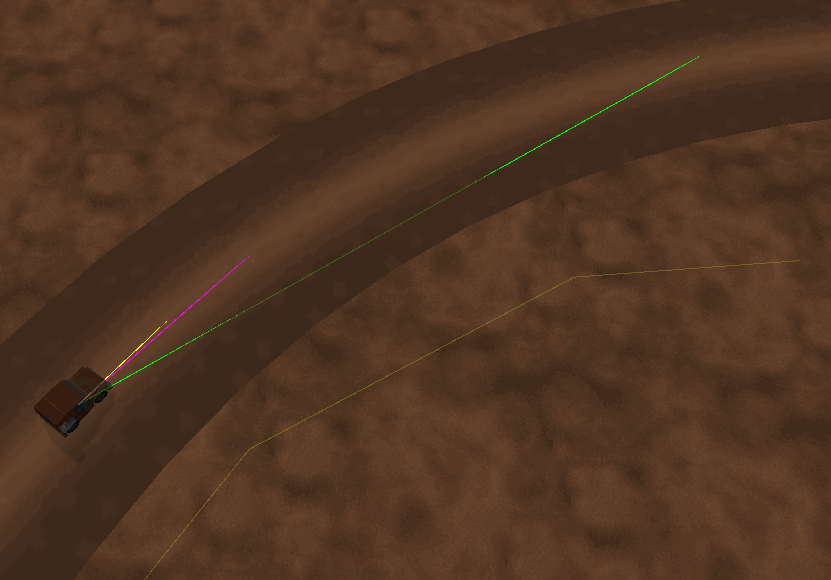
During initial development the first debugging information used was the node positions, represented using the provided ‘line drawing’ class. Nodes were represented as yellow boxes and gave me an understanding of the first task of the navigation system – the ability to place the nodes, which resulted in fixing small issues resulting from ray-tracing wall offsets and such.
The most interesting debugging information was not actually the calculated paths themselves, but the traces between nodes which formed complex networks if I chose to display failed paths as well as the succeeded paths to other nodes.
Figure 2 – Failed paths being rendered resemble the possible areas the bot can travel to.
The final visual debug information that was provided was the paths themselves, which are updated when the nearest target or start node has changed.
Combat is handled almost identically to that of the original bot design. A ray trace is performed between both bots to determine if the bot is in clear sight with no walls obstructing the view and the movement style is changed to a twitch style until this clear line of sight is broken. The bot fires in a 3-round burst and changes direction if hit, assuming it has not changed direction very recently to prevent stuck positions. The combat and path-finding techniques are switched between flawlessly.
I also looked into some alternative path-finding algorithms to use for this scenario. The most likely alternative path-finding algorithm that could be used in place of A* is Dijkstra, which A* is based upon, requiring very little modification to reach a functional state.
Personally I found that the most interesting alternative to A* path-finding are navigational meshes. Rather than paths being determined by individual nodes and connecting by what are essentially thin lines, navigation meshes differ as they represent volumes of reachable areas rather than specific points.
Navigation meshes provide various advantages over traditional node-based systems and is able to perform the same operations as a node system. Navigational meshes are now beginning to become more common in games such as the Unreal Engine 3 as well as updates to the Source engine in 2011.
Some of the advantages to a navigational mesh include the ability to predict faster paths, ensuring entity accessibility to an area as well as various surfaces such as the instruction to jump, climb or crouch in a particular nav-mesh.
The past few weeks have been quite interesting. My Uni has moved the campus to a different building, and at some point I did some actual work on assessment items. Primarily a networking item. The goal – produce a networked chat client that uses a 3D engine. Not much is asked, but as someone with no experience whatsoever in networking it was an interesting learning process. Nevertheless I came up with a reasonably stylish chat-client that had an interesting combination of features.
A simple smokey particle engine puffs in the background as the server list greets you at start up. The server look-up is done via a multicast heartbeat packet.
To keep things a bit more interesting than simple text, there’s the very basic client customisation – a username and a text colour!
A simple chat system layout. The messages here are sent via a client list that the server acquires, as well as the various port numbers that are automatically allocated to each client. This allows multiple clients on the same machine, even the one that the server is on.
The server is a simple console client that takes care of the server side of things. Likewise, the client also does a lot of the behind of the scenes work in its own little category and used to be a console as well. Eventually when the strange crashes and weird network situations stopped piling up, I moved onto the graphical interface.
As you may have noticed the above example is done on a local machine, hence the 127.0.0.1 address. It does however work over a local network, although I have not tested it over the internet. In theory it should work fine, as the TTL packet setting is sufficient, and since I’m not using broadcasting but instead multicasting, internet communication is a viable option. Lastly, everything’s done via UDP since UDP is really the way to go when it comes to game networking (even though this isn’t really a game and may well have functioned with TCP)
Not a whole lot of information posted, but at least there’s a few shiny pictures
. I may post the source code at some point. The engine is a custom and somewhat heavily modified version of the latest Ogre build, but only uses Ogre, CEGUI and Winsock 2 in this project.
Some interesting patterns I came up creating bullets in my doomed purposeless space shooter.
At this point it crashed, but performance was still great!
So I found out some interesting things today at QANTM. Firstly the entire campus is moving in less than five weeks and somehow I was never informed but ah well.
Secondly, the course I had today, ‘Managing New Media Projects’, involves an entire tutorial group which in my case consists of 28 people working together to develop a simple game. The purpose of this course is not the actual end product but the process of project management. In both cases of this and the actual project, it appears that out of all 28 people, I’m the only programmer. Oh ****.
So in my one-man army as Tech lead (leading.. what?) I’m going to be responsible for hosting source versioning control, ’coding’ the game (obviously) and integrating all assets into a compatible format. Fortunately for me the entire group has chosen to use Unity which pretty much means there’s not really any programming to do (although that’s a bit boring for me but it leaves me plenty of room for my other courses). Basically me and a few designers will use Unity’s simple integrated JavaScript language to make a 2D sidescroller of some sort.
What this also means is that my very exciting space project no longer has any real use, although I will most likely continue it as a side project for fun.
Over the past two days I’ve made my little SFML & TinyXML powered project. Today I implemented input, which in the case of SFML already having an input system all I needed to do was forward the hooks to the game entities in my entity manager.
Right now it isn’t much; quite literally just some simple sprites on the screen, but the actual core mechanics are more or less done. I’ve made a short and fairly meaningless recording of XML configs that at this point pretty much determine all the content in the game, and it will most likely stay this way for the actual purpose of it.
If you can’t view the above please upgrade to a browser from the last 3 or 4 years ago, seriously.
Essentially I show three basic sprites being loaded at set time intervals and eventually play back a sine wave movement pattern. The fact the sine wave movement can be replicated with a single line of code from the C math library is not relevant, the actual data driven system is.
Right now I’m hesitant to go any further as I have yet to receive any confirmation of what the group project is going to be, but this should at least give me some breathing room for the first week or so. The last item I might implement is the actual bullet firing which hopefully will result in some very artistic programmer art.
With my second year of Uni starting next Monday and having done mostly contract work I haven’t exactly been able to do everything I wanted to do in terms of programming. I was somewhat considering writing my own DirectX 11 rendering engine, although at this point I’d rather wait and see what my final project ends up being – it helps to know if it’s even going to be 3D or not.
With that said, with the exciting addition of networking, AI, Ogre 3D, new media business compliance and managing new media projects comes the first proper time when, as students, we are properly co-developing a game. Although I’ve now had my first bit of group-work experience behind me from only the start of this year, chances are this will be nowhere near as smooth considering. While the ‘designers’ fight eachother off with ideas I’ll be quietly preparing the framework of what we’ll be using.
Essentially from what I’ve gathered it’s going to be a space shooter, simple and 2D and of course we all have to do something at one point or another. Fortunately I just already happen to have made a start on that and have prepared an SFML 2 build with the addition of the TinyXML parser and some careful core mechanics written by me to ensure we’re going to have a very stable and powerful little game tool.
Although I did originally think about a level editor, it ended up seeming impractical due to the nature of these simple top-down little 2D games where level design can just as easily be written by simple text documents. Essentially there will be two kinds of documents:
I’ve already designed an effective system in my mind from one-too-many nights of idiopathic insomnia and, despite the project not having officially started yet, am quite confident to say we’re going to get some mighty fine grades, so I can focus on some of the other courses (such as all the programmers having a little self-programmed robot fight – nerd power for the win!)
Excuse the lack of a screenshot, I was contemplating adding one in but right now it is literally a black screen with the occasional XML data and some test sprites on it. I think in the future I may begin including HTML5-based video samples rather than images as images are becoming limited in terms of telling a story.
Since my blog isn’t looking so intense and action packed this month I guess it’s time for another post! I was actually quite tempted to write a nice article about my particle rendering engine that ran using a very, very flexible data driven plugin system (aka support for scripting/modding).
Unfortunately, all three sources of back-ups are gone from my project files. First I whiped an entire 2 terrabyte hard drive, which was basically the main location of my most recent files, then a solid state drive failed which, as it was in a RAID volume at the time could not be recovered. And finally, my USB became so unbearably slow I couldn’t seem to transfer to or from it anymore, which is rather disappointing, so please forgive me for the lack of images in this post.
I did at some point post an image of it, however this is from a fairly early version, probably the moment I only got particles working.
It was a nice system, rather than using point sprites which was all that was required I decided to use triangle lists (in a somewhat simplified English version, I took control of the particles rather than them being automatically created somewhat) and after figuring out how to turn them into billboard sprites (make them always face the camera) I had a funky system of very customisable particles!
Anyway enough about the particles, I doubt they sound interesting after three paragraphs. I passed all my courses this trimester, believe it or not, and that means I’ve passed my first year. Surprisingly with some very colourful and bright grades (How I got a distinction for a math subject is beyond me).
Next trimester, from what I’ve gathered from the nice folk at QANTM who are teaching me I’m doing a group project. What I’d really like to dive in to, which I somewhat did by making my particle system data-driven, is possibly even further that into an external tool that allows designers that I’m allocated with to add content to the game without a single line of code. This isn’t something I’ve done before so it should be interesting.
The downside of the group project is that, with the current students I’m most likely being put into a group of 5-6 designers, and some animators and artists, with me being the only programmer. Inevitable conflict, but oh well.
Earlier this week was quite an interesting experience. I performed focus testing for SEGA Studios Australia with a friend of mine who I dragged along, as well some on-going contract work for a separate party. That’s literally as much as I’m allowed to say, since I’ve signed my first few contracts (Man, I feel so professional and capitalist-like!)
In the hope of not creating an incredibly boring series of posts, with paragraphs that no one would be willing to read I’m going to end it here, hopefully with some more exciting and visually-appealing content for my next post which again, hopefully isn’t too far in the future. Most likely a new iPhone game that I’ve been working on for roughly 2 months now, give or take a few days of delays, that should be ready for release early January.
As it’s yet again been some time since I’ve last posted anything, I’ve decided to post some info on my Octree terrain engine that I’m submitting sometime later this week as an assessment piece. Below I’ve copied and pasted directly from a document that I’m submitting as part of a detailed analysis of my development cycle.
I’ll see if I can upload a demonstration executable along with its source code later when I revise the code a bit more, as right now it’s a bit of a mess with comment blocks everywhere.
By Johan Rensenbrink
As I’ve gone a far bit over the word count I’ve split the major topics into sub-sections, so feel free to only read whatever seems interesting, or whatever you need to. As I’ve revised my octree project after creating this document I may have repeated myself a little bit, but I’ve tried to make sure that if this happens it’s no more than ~50 words of repetition.
Although performing a physical simulation was something that seemed quite interesting to me, I had decided to do some form of optimization technique as I personally thought that it will most likely be more useful and relevant for further programming in QANTM, since there aren’t frameworks or packages that do these things for us, unlike physics.
Narrowing that down, that brought me to a range of different choices. Quadtrees, octrees, portals and so forth. I was mainly interested in the area of quadtrees and octrees, as I had predicted that portals would be somewhat overwhelming with having the addition of occlusion culling. I decided to start simple, and have a go at quadtrees instead, with the idea that once I figured out the basics of that to move on with an octree.
I started the project where I left off with the previous assessment. I did not have any form of optimization, and in this case a quadtree wouldn’t be very useful without some kind of frustum culling. Fortunately, I discovered it was surprisingly easy to implement such a thing with DirectX helper functions such as D3DXPlaneDotCoord and had no issue implementing a few different forms of collision functions involving points, spheres and boxes. For the octree itself I ended up using a sphere and the eight corners of each leaf node to minimize false-positives.
My decision to upgrade to an octree actually came when I started to draw the quadtree outlines using with debug lines. I set two fixed Y values to make it easier to interpret it as a box instead of infinite lines which seems confusing in a way. Here I realised that an octree was literally just adding one dimension, and increasing the children from four to eight (quad -> oct, whoah!). Within minutes I had a something working already.
Debug features everywhere!
For debugging, I have a range of options, such as ‘halving’ the view frustum that makes it possible to see terrain patches around the edges of the screen dissapear as well as walking on the terrain to simulate a practical scenario. The most useful debug feature I had was using a console window and directly feeding that with std::cout from the good old days of ‘Hello World’.
My octree ended up being very dependent on the terrain class. Unfortunately that isn’t particularly flexible but it was perfectly sufficient for the purpose of this demonstration. The terrain object itself would instantiate and manage its own octree. The reason for this was to easily import settings from the terrain without having to change this as I was trying a lot of small changes to fix things and improve things.
One issue that turned up, and wasn’t really suprising to find was the matter of the terrain causing splits between nodes. Rather than implementing a system that would have to connect each patch and probably leading to somewhat of a headache-inducing night of programming, I decided to give each patch an overlap of one terrain unit size. This way, everything connects wonderfully and even with ~800 nodes, aka 256 triangles max of a 30,000 triangle terrain I only gain around 1,000 triangles which seems very nice. Gaining a 30th in mesh complexity does not seem like it would ever create a performance issue even in complex situations (20fps – 0.67fps = who cares?).
Terrain splitting, argh!
As an additional feature I had a look at a simple LOD interface. Over distance from the camera, the terrain would become ‘simpler’. This was working great within minutes but brought me to a new issue. Terrain patch borders would have unequal heights. One solution I read about was adding ‘skirts’, but as my quadtree was using index buffers instead of vertex buffers for each patch this was not possible. After an hour or so I had my terrain grid working with borders, only to realise the same problem would occur with the borders and the inner sections so I decided to skip the idea of LODs for the time being. If I was to continue trying to solve the issue I would possibly end up switching from index buffers per tree patch to vertex buffers, either to create cheap ‘skirts’ or otherwise somehow better synchronize the height of the patch borders to account for the lack of vertices in neighbouring patches, which seems like the best solution (flattening two vertices for each one vertex of the ‘lower’ quality neighbour patch)
One more thing I wanted to look into was optimising my octree as one of the last tasks. I had a look at making both a large index buffer and vertex buffer for the entire terrain, with each patch simply adding indices to the index buffer during the render function. The idea was to reduce the draw calls from potentially hundreds down to a single call, without sacrificing the whole point of the quadtree culling out leaf nodes that can’t be seen. A major downside was that the index buffer would have to be locked/unlocked each render call rather than only once, therefore I was somewhat unsure if this would still be an improvement over multiple draw calls. In the end I ended up doing this which improved performance and incredible amount (4FPS -> 200FPS rendering ~800 nodes)
During the initial stages of creating a quadtree (before the octree itself) was deciding how to split the terrain up. The initial idea was to use a large index buffer for the terrain and a vertex buffer for each patch after researching this on the internet. I ended up inverting this and having a large index buffer with a vertex buffer for each patch as it made it easier to control small changes I made to the terrain and it ended up working fine. However, using index buffers for each patch did prevent the idea of a ‘skirt’ for the LOD I was talking about earlier. Although I haven’t done this, I think the index buffer does potentially solve connecting ‘lower’ terrain leaf nodes to ‘higher’ ones if I did not make the terrain height-independent.
There were two issues that remained within the final version of my octree terrain engine. Essentially this was due to an issue with generating each terrain node but despite several attempts of resolving this problem I just couldn’t find the source that caused it. The triangle count of the rendered terrain increases depending on how many grids are visible at once. For example, with only one node, there are 30,258 triangles being rendered. With 729 nodes (from splitting above 256 triangles per node) there are 72,826 triangles, more than double than the original terrain.
The second issue, which is most likely linked but not entirely caused by the first one, is performance. When there is one node for the entire terrain, I have 180FPS displaying the entire terrain. With 729 nodes, I have only 4FPS. It’s extremely unlikely that rendering 60,000 triangles could cause this big of a performance hit, seeing as most modern games easily render over a million per frame.
Fortunately, I was able to resolve both of these issues. The first issue was caused by incorrect calculation of node boundary boxes, which was extremely odd as they rendered correctly despite some very wrong values. Now with 729 nodes I have roughly 31,000 triangles. The extra triangles are create by overlapping the borders of nodes to compensate for connection issues (gaps otherwise form).
The second issue was resolved by removing the index buffer for each patch and having the quadtree manage one vertex buffer and one index buffer. Octree nodes would now only contain index data without their buffers. This has led to a huge performance increase, with 280FPS (100FPS more than displaying nothing with individual index buffers despite having nothing to draw!) and around 200FPS with the entire terrain visible.
Although it’s somewhat delayed, I’ve got the excuse of my solid state drive’s life coming to an end, etc. etc.
Source is included in the ZIP.
The above screenshot actually marks the final part of the math demonstration, with the rendering already done. Again this is just demonstrating the basic abilities of DirectX 9, but regardless this was quite a fun little project.
I’m not entirely done yet, with one more feature left and one more attempt at stressfully trying to fix my blending mode demonstration (since I’m having some issues setting blending operations correctly in regards to simple additive and subtractive modes). Once I do, however, which will be tomorrow sometime since I’m taking a little break, I’ll upload it here if you desperately want to watch a box rotate or such.
Stencils appear to be quite a tricky thing to get working well in DirectX. They’re extremely handy, but they’re not one of the easiest things. Fortunately I was able to implement a pre-existing shadow example that showed a teapot shadowed on a white plane and implemented it into my own engine.
You can immediately see the FPS isn’t at a very pretty value. This is for good reason however. I may not be using any optimization techniques such as portals yet, but my code is structured quite well. It just so happens that the model that is being shown has around 300,000 polys. Still no biggy. Except, instead of having a simplified mesh for the shadow, I’m rendering all 300,000 polygons for the shadow as well which takes a lot more calculations. Without the shadow I receive around 160FPS. Without the terrain I get a more decent 600FPS, and without the model around 3000FPS. This is all still with 16xAF and 8xAA filtering enabled.
The DirectX demonstration has all the necessary features so far, and although you can’t see this in the screenshot I’ve been working on making the memory management efficient as well as adding a scene manager that now allows me to very quickly swap between different ‘scenes’. These scenes basically consist of two arrays, one for drawn objects and one for the lights. Text can also be individually added per scene and the key buffer is directly linked to both objects as well as the scene so user input can be efficiently managed.
With everything I need written in code, for both rendering and math demonstrations, I just need to write the actual separate showcase items with the base code that I’ve written so far.